







Free trials that expire in 14 days. ‘Free’ plans that lock every useful feature behind a paywall. Credit card required, just to see what the tool looks like.
If you’ve been burned by that cycle, this list is for you.
I’ve spent serious time researching and testing AI tools across writing, image generation, productivity, coding, and research. What follows are the 10 genuinely free tools I keep coming back to, tools where the free tier is actually useful, not a teaser. Each one was evaluated on output quality, how generous the free limits actually are, and whether a beginner can get real value without spending a cent.
No filler. No tools I wouldn’t use myself.
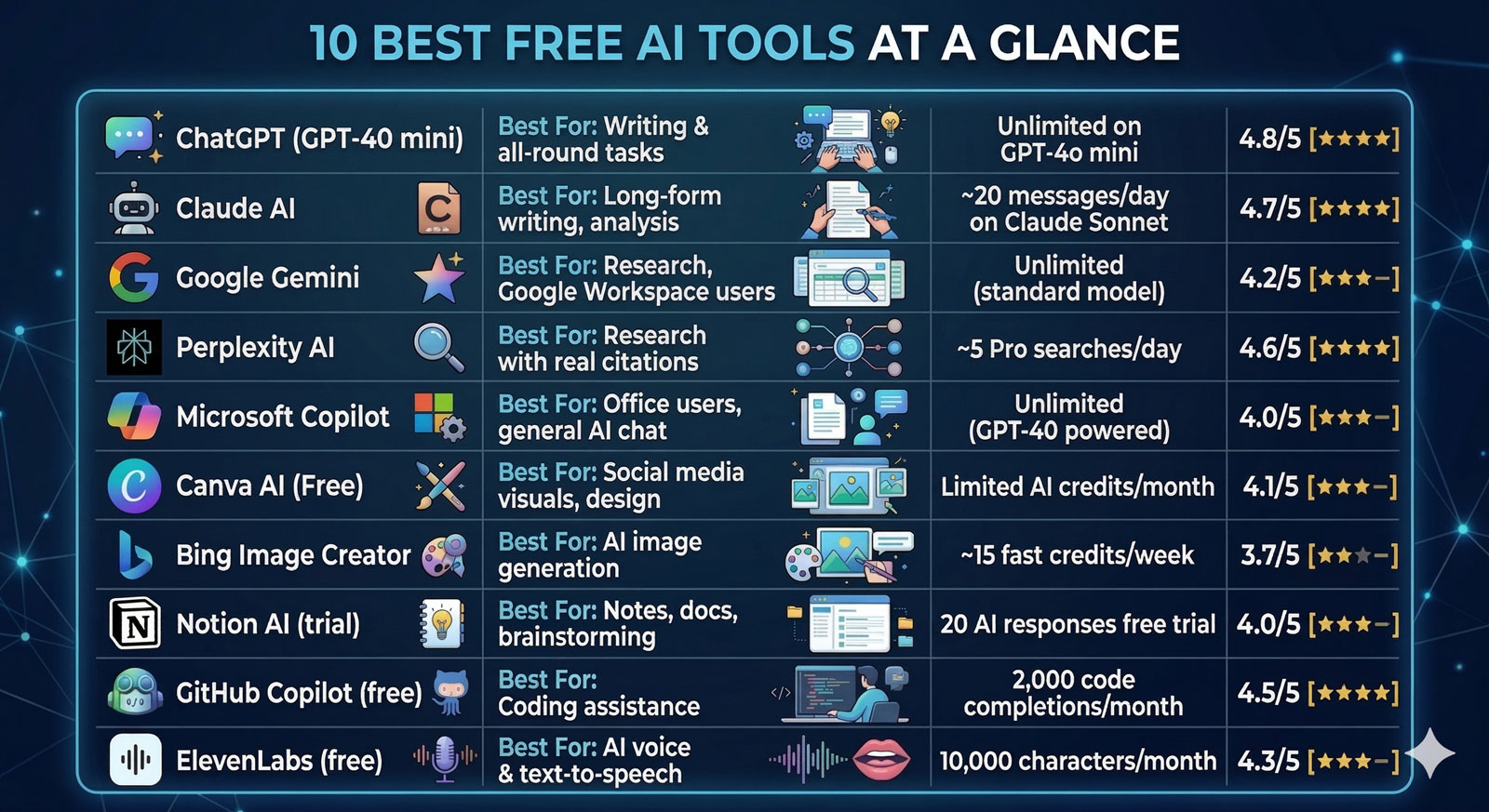
Quick Comparison: 10 Best Free AI Tools at a Glance
| Tool | Best For | Free Tier Limits | My Rating |
| ChatGPT (GPT-4o mini) | Writing & all-round tasks | Unlimited on GPT-4o mini | [*****] 4.8/5 |
| Claude AI | Long-form writing, analysis | ~20 messages/day on Claude Sonnet | [*****] 4.7/5 |
| Google Gemini | Research, Google Workspace users | Unlimited (standard model) | [****-] 4.2/5 |
| Perplexity AI | Research with real citations | ~5 Pro searches/day | [*****] 4.6/5 |
| Microsoft Copilot | Office users, general AI chat | Unlimited (GPT-4o powered) | [****-] 4.0/5 |
| Canva AI (Free) | Social media visuals, design | Limited AI credits/month | [****-] 4.1/5 |
| Bing Image Creator | AI image generation | ~15 fast credits/week | [***–] 3.7/5 |
| Notion AI (trial) | Notes, docs, brainstorming | 20 AI responses free trial | [****-] 4.0/5 |
| GitHub Copilot (free) | Coding assistance | 2,000 code completions/month | [*****] 4.5/5 |
| ElevenLabs (free) | AI voice & text-to-speech | 10,000 characters/month | [****-] 4.3/5 |
1. ChatGPT (GPT-4o mini) – Best All-Round Free AI Tool
[*****] 5/5 Verdict: The most versatile free AI tool available and the right place to start for most beginners.
ChatGPT’s free tier now runs on GPT-4o mini, OpenAI’s lightweight but genuinely capable model. It handles writing tasks, brainstorming, summarizing documents, answering research questions, and basic coding with no session cap. In my testing, the free tier produces clean, readable prose that beats what plenty of paid tools were offering two years ago.
The interface is the most intuitive in the category. If you’ve never used an AI chatbot before, ChatGPT is the smoothest entry point, and you don’t need to know anything about prompt engineering to get useful results on day one. (Though you’ll get much better results once you do. More on that below.)
Best for: Absolute beginners, writers, marketers, anyone trying AI for the first time
Free Tier: Unlimited messages on GPT-4o mini. Limited access to GPT-4o (the full model) on the free plan. But you’ll hit the cap quickly if you’re a heavy user.
Pros:
- No credit card, no expiry: genuinely unlimited on the free model
- Handles almost any text-based task: writing, editing, summarizing, coding, Q&A
- The Custom GPTs feature (even on free version) gives you access to specialized tools others have built
- Memory feature is available on free plan. It can remember your preferences over time.
Cons:
- GPT-4o (the smarter model) is rate-limited on the free plan. You’ll hit the wall at inconvenient moments
- No internet browsing or image generation on the free tier.
- Output can feel generic without good prompts. This is a ‘you get what you ask for’ tool.
→ Try it free: chatgpt.com
2. Claude.ai – Best Free AI for Long-Form Writing and Analysis
[*****] 5/5 Verdict: If writing quality is your priority, Claude’s free tier punches above its weight.
Anthropic’s Claude is my personal go-to for anything that requires sustained, coherent writing, long blog posts, research analysis, summarizing dense documents. The free tier gives you access to Claude Sonnet (the mid-tier model), which is more capable than GPT-4o mini for complex writing tasks and follows detailed instructions more precisely.
The catch is the daily message limit. You get roughly 20 quality responses per day on the free plan, which goes fast if you’re working on a long project. But for someone just starting out, testing Claude’s capabilities, or using it for one solid writing session per day, the free tier is genuinely useful.
One thing that consistently surprises people new to Claude: how naturally it writes. It’s less robotic than most alternatives at the same time. That’s a real differentiator for content work.
Best for: Writers, bloggers, researchers, anyone who cares about prose quality
Free Tier: ~20 messages/day on Claude Sonnet 4. No image generation. No internet access.
Pros:
- Writing quality is noticeably better than most free-tier alternatives
- Follows complex, multi-part instructions better than ChatGPT free
- Handles long context well; you can paste in entire documents for analysis
- Clean, distraction-free interface
Cons:
- Daily message limits are a real constraint for heavy users
- No built-in web search on the free tier
- No image capabilities
→ Try it free: claude.ai
3. Google Gemini – Best Free AI for Research and Google Users
[****-] 4/5 Verdict: The most genuine unlimited free tier on this list, and the best integration with Google’s ecosystem.
Google Gemini (running on the standard Gemini 1.5 Flash model for free users) doesn’t impose a daily message cap. You can chat all day without hitting a wall. For beginners who want to explore AI without any limits, that’s a significant advantage.
Its strongest use case is research. particularly for people who live in Google Docs, Gmail, and Drive. Gemini integrates with Google Workspace, which means it can draft emails, summarize documents in Drive, and work inside Docs without you copying and pasting content.
Pure writing quality lags behind Claude and ChatGPT on complex tasks. The prose occasionally feels corporate and over-hedged. But for research, summarization, and Google-ecosystem tasks? It’s impressively useful for a free tool.
Best for: Google Workspace users, researchers, people who want unlimited free AI usage
Free Tier: Unlimited messages on standard Gemini model. Access to Gemini Advanced (1.5 Pro) requires Google One AI Premium ($19.99/month).
Pros:
- No daily message limits on the free plan; genuinely unlimited
- Google Workspace integration is best-in-class for Docs/Gmail/Drive users
- Real-time information access; no knowledge cutoff issues
- Available across Android and iOS with Google Assistant integration
Cons:
- Writing quality on nuanced creative tasks trails Claude and ChatGPT
- Gemini Advanced (the actually impressive model) is paywalled
- Occasionally verbose and over-cautious in responses
→ Try it free: gemini.google.com
4. Perplexity AI – Best Free AI for Research with Real Sources
[*****] 5/5 Verdict: The most useful free research tool available right now. Nothing else cites sources the way Perplexity does.
Perplexity isn’t trying to be a writing assistant. It’s a research tool, and a very good one. You ask a question, it searches the web in real time, synthesizes findings from multiple sources, and gives you a cited answer, with links to every source it used. For fact checking, quick research, or getting a grounded overview of any topic, it’s unmatched on the free tier.
Content creators specifically find it valuable for the research phase of writing; gathering statistics, finding recent studies, checking facts before putting them in a draft. The free plan includes standard searches without limit, plus a handful of ‘Pro Search’ queries per day (Pro Search uses more sophisticated reasoning and more sources).
(I use Perplexity for research, then Claude for the actual writing. That two-tool combo covers most content creation needs at zero cost.)
Best for: Researchers, content creators, students, anyone who needs accurate, cited information
Free Tier: Unlimited standard searches. ~5 Pro searches per day. Perplexity Pro ($20/month) unlocks unlimited Pro searches and Claude/GPT-4o model access.
Pros:
- Cites every source, you can verify any claim instantly
- Real-time web access means no outdated information
- Answers are condensed and structured, not a wall of text
- The follow-up question feature makes it easy to dig deeper on any topic
Cons:
- Not a writing tool. So, don’t expect polished prose output
- Pro searches (the best ones) are capped at ~5/day on free
- Occasionally surfaces lower-quality sources if the topic is niche
→ Try it free: perplexity.ai
5. Microsoft Copilot – Best Free AI Powered by GPT-4o
[****-] 4/5 Verdict: A legitimately impressive free tier. GPT-4o under the hood, no subscription required.
Here’s something not enough people know: Microsoft Copilot’s free web version runs on GPT-4o, the OpenAI’s full flagship model, not the mini version. That’s a meaningful quality advantage over ChatGPT’s free tier, which defaults to GPT-4o mini. For someone who wants GPT-4o quality without paying, Copilot is the legitimate way to get it.
It also includes Bing-powered web search, image generation (via DALL-E 3), and document analysis on the free plan. That’s a feature set that costs $20/month on ChatGPT Plus.
The interface is less polished than ChatGPT and Claude, and it sometimes adds excessive caveats and safety disclaimers. But for raw AI capability on a free plan, nothing else on this list competes.
Best for: Anyone who wants GPT-4o quality for free, Windows/Edge users, people who want image generation without paying
Free Tier: Unlimited access on GPT-4o. DALL-E 3 image generation (limited). Web search included. No credit card required.
Pros:
- GPT-4o on the free plan, the best free AI model access available right now
- Real-time web search built in by default
- DALL-E 3 image generation included free
- No daily message limits on standard usage
Cons:
- Interface is clunkier than ChatGPT and Claude. So, less intuitive for beginners
- Tends to add unsolicited caveats and hedging to responses
- Image generation quality has lower limits on the free plan (fast credits run out)
→ Try it free: copilot.microsoft.com
6. Canva AI (Free Plan) – Best Free AI for Visual Content Creators
[****-] 4/5 Verdict: If you create social media content, this is the free AI design tool you’re looking for.
Canva’s free plan includes a suite of AI features that would have cost seriously three years ago. Magic Write (AI text generation), background removal, AI image generation, and basic photo editing are all available without a Pro subscription.
For content creators who need branded visuals; blog featured images, Instagram posts, LinkedIn graphics, YouTube thumbnails. Canva AI is the most practical free tool available. The template library is enormous, and the AI features layer on top of it rather than replacing it. You’re still designing; the AI just handles the tedious parts.
The free AI credits are limited and reset monthly. You won’t be generating 50 images a day on the free plan. But for a creator producing 8-12 pieces of content per week, it’s usually enough.
Best for: Social media managers, bloggers, content creators, small business owners who need visual content without a design budget
Free Tier: Limited AI generation credits per month. Full template library access. Background remover, Magic Write, and basic AI tools included.
Pros:
- All-in-one design + AI; no need to jump between tools
- The template library is genuinely excellent for social media formats
- Background removal and image editing AI features are reliable and fast
- Works entirely in the browser, no software to install
Cons:
- AI generation credits are limited. Pro ($15/month) removes this friction
- AI-generated images are not best-in-class. Midjourney produces far better results
- Magic Write (AI text) is basic. Don’t use it as your primary writing tool
→ Try it free: canva.com
7. Bing Image Creator (DALL-E 3) – Best Free AI Image Generator
[****-] 4/5 Verdict: The best free access to DALL-E 3 — and the output quality is legitimately impressive for a free tool.
Bing Image Creator gives you direct access to DALL-E 3, OpenAI’s image generation model for completely free, with just a Microsoft account. You get around 15 ‘fast’ credits per week (which generate images quickly), and after that, generation slows down but doesn’t stop.
For bloggers who need featured images, social media creators who want AI visuals, or anyone experimenting with AI image generation, this is the obvious starting point. The images are photorealistic, can handle complex prompts, and don’t watermark your output.
The gap between Bing Image Creator and Midjourney Pro is real. Midjourney produces more aesthetically refined results with better prompt adherence on complex scenes. But for free? DALL-E 3 through Bing is excellent.
Best for: Bloggers, content creators, social media managers, anyone needing free AI-generated images
Free Tier: ~15 fast credits/week (resets weekly). Slower generation after fast credits are used. No watermarks. Requires a Microsoft account.
Pros:
- DALL-E 3 quality at zero cost. This is a genuine deal
- No watermarks on generated images
- Handles text in images better than most generators
- Simple interface, describe what you want, get an image
Cons:
- 15 fast credits per week goes quickly if you’re doing volume work
- After fast credits, generation can be slow (several minutes per image)
- Less style control than Midjourney, photorealism is strong, artistic styles less so
→ Try it free: bing.com/images/create
8. Notion AI (Free Trial) – Best AI for Notes and Knowledge Management
[****-] 4/5 Verdict: Not technically free forever. But the trial gives you enough to know if it’s worth paying for, and the integration with your notes is genuinely useful.
I’m including Notion AI on this list with full transparency: it’s a free trial of 20 AI responses, not a permanent free tier. After that, it’s $10/month added to your Notion plan. I’m including it because the trial is generous enough to be genuinely useful, and the core Notion product (without AI) is free.
What makes Notion AI different from the other tools here is context. Because it operates inside your notes and documents, it has access to everything you’ve already written and organized. Ask it to summarize your meeting notes, draft a blog outline from your research notes, or fill in a content brief. It works with your actual content, not in a blank chat window.
For someone who already uses Notion as their second brain, the AI features are a natural extension. For someone who doesn’t use Notion, this isn’t the right entry point.
Best for: Existing Notion users, content planners, anyone who organizes research in Notion before writing
Free Tier: 20 AI responses free trial. After trial: $10/month AI add-on (Notion base plan is free).
Pros:
- Contextual AI; works with your actual notes and documents, not a blank slate
- AI writing, summarizing, and brainstorming inside the tool you’re already working in
- Good for content planning workflows, briefs, outlines, calendar drafts
- Clean interface, excellent template library for content creators
Cons:
- Not truly free. The 20 response trial ends, then it’s $10/month
- Only useful if you’re already a Notion user or willing to adopt it
- AI quality is solid but not best-in-class compared to Claude or ChatGPT
→ Try it free: notion.so
9. GitHub Copilot (Free Plan) – Best Free AI for Developers
[*****] 5/5 Verdict: If you write code, this is the most impactful free AI tool on this entire list.
GitHub Copilot launched a free tier in late 2024, and it’s genuinely substantial: 2,000 code completions per month and 50 chat messages, with access to both GPT-4o and Claude Sonnet for in-editor AI assistance. For developers building personal projects, learning to code, or testing AI-assisted development, this is a massive upgrade from nothing.
Copilot works inside VS Code, JetBrains IDEs, and other major editors. It autocompletes code in real time, explains functions, suggests bug fixes, generates entire functions from comments, and answers code-related questions in a chat panel alongside your editor.
Non-developers can skip this one. But if you write code even occasionally, the free Copilot plan is one of the best AI deals currently available.
Best for: Developers, students learning to code, freelancers building web projects
Free Tier: 2,000 code completions/month. 50 chat messages/month. GPT-4o and Claude Sonnet available. Requires a GitHub account.
Pros:
- In-editor completions are fast and contextually aware. It understands your whole codebase
- Access to both GPT-4o and Claude models on the free plan
- Dramatically accelerates repetitive coding tasks, boilerplate, unit tests, documentation
- Works inside the tools developers already use
Cons:
- 2,000 completions/month goes quickly for full-time developers
- Occasional hallucinated code suggestions; always verify before deploying
- Not useful for non-developers. This is a specialist tool
→ Try it free: github.com/features/copilot
10. ElevenLabs (Free Plan) – Best Free AI for Voice and Text-to-Speech
[****-] 4/5 Verdict: The most realistic free AI voice generation available. The output quality will genuinely surprise you.
ElevenLabs makes AI voices that don’t sound like AI voices. That’s a rarer achievement than you’d think. The free plan gives you 10,000 characters per month, roughly 7-8 minutes of audio, which is enough to produce podcast-quality voiceovers for short videos, experiment with voice cloning, or add narration to presentations.
Content creators use ElevenLabs for YouTube voiceovers on faceless channels, text-to-speech for social media videos, and accessibility audio for blog content. The voice library on the free plan includes dozens of pre-built voices that are professional enough for real content.
Voice cloning (uploading your own voice for the AI to replicate) is available on paid plans. The free tier is limited to the pre-built voice library, which is more than enough to start.
Best for: YouTubers, podcast creators, video content makers, anyone who needs realistic AI voiceovers
Free Tier: 10,000 characters/month (~7-8 minutes of audio). Access to pre-built voice library. Voice cloning requires Starter plan ($5/month).
Pros:
- The most realistic AI voice generation available at any price point
- Huge voice library, multiple accents, genders, ages, and styles
- Fast generation; a 2-minute voiceover is ready in seconds
- Usable for commercial projects on paid plans. Check terms on the free tier
Cons:
- 10,000 characters/month is limiting for high-volume content creators
- Voice cloning is paywalled. You’re using someone else’s voice on the free plan
- Audio quality occasionally dips on complex sentences with unusual phrasing
→ Try it free: elevenlabs.io
How to Choose the Right Free AI Tool for You
Ten tools is still ten choices. Here’s a simple framework to figure out which ones actually matter for where you are right now.
🖊️ If you’re a writer or content creator:
Start with Claude (free) for quality writing and long-form drafts.
Add Perplexity for research and factchecking.
Use Canva AI for visuals. That three-tool combo covers 90% of a content creator’s AI needs — at zero cost.
📊 If you’re a marketer or business owner:
Start with ChatGPT free, the most versatile starting point.
Add Microsoft Copilot for image generation and web-search-backed responses.
Use Canva AI for branded visual content.
💻 If you’re a developer:
GitHub Copilot free is the non-negotiable first tool.
Add ChatGPT or Claude for architecture discussions, debugging, and documentation.
🔍 If you’re a student or researcher:
Perplexity AI for any research task, cited sources are non-negotiable for academic work.
Google Gemini for unlimited usage and Workspace integration.
Claude for synthesizing and writing up your research.
🎬 If you make video or audio content:
ElevenLabs for voiceovers.
Bing Image Creator for thumbnails and visual assets.
ChatGPT or Claude for scripting.
The honest answer on using multiple tools: You don’t need to pick one. Most of these are complementary. A typical workflow for a content creator might touch Perplexity (research), Claude (writing), and Canva AI (visuals), three free tools, zero overlap, covering the entire content production process.
Frequently Asked Questions
Are these tools actually free, or do they require a credit card?
All ten tools on this list have a free tier that requires no payment information to access. ChatGPT, Claude, Google Gemini, Perplexity, Microsoft Copilot, Bing Image Creator, and GitHub Copilot are free with just an email sign-up. Canva and ElevenLabs require an account but no credit card for the free tier. Notion AI is the one partial exception. The base Notion product is free, but the AI add-on is a paid feature after the 20-response trial.
What’s the difference between ChatGPT free and Microsoft Copilot free?
Both use GPT-4o but the implementation differs. Microsoft Copilot’s free version uses the full GPT-4o model with fewer restrictions. ChatGPT’s free tier defaults to GPT-4o mini (a smaller, less capable model) and only gives limited access to full GPT-4o. If you want the best writing quality without paying, Copilot currently offers better model access for free. ChatGPT compensates with a more polished interface and the Custom GPTs ecosystem.
Can I use AI-generated content commercially on the free tiers?
It depends on the tool and your jurisdiction. Generally: ChatGPT, Claude, and Microsoft Copilot grant you rights to use output commercially on all tiers. ElevenLabs has restrictions on the free tier for commercial audio use. Check their current terms before monetizing free-tier voiceovers. Canva’s free tier also has some template licensing restrictions for commercial use. When in doubt, read the terms of service or upgrade to a paid plan for clear commercial rights.
Which free AI tool should an absolute beginner start with?
ChatGPT. No qualification needed. The interface is the most intuitive, the documentation and tutorials are most abundant, and the free tier is genuinely unlimited. Once you understand how to prompt AI effectively, which takes a week or two of regular use, you’ll naturally gravitate toward the tool that fits your specific work best. But start with ChatGPT, learn the basics, then branch out.
Final Verdict: My Top Pick from This List
If you’re new to AI and can only bookmark one tool from this list, make it ChatGPT. It’s the best learning environment, the most versatile, and the most documented.
But if you’ve already spent some time with AI tools and you’re specifically looking for the highest-quality free writing assistant? Claude wins. The writing output is more natural, the instruction-following is more reliable, and the experience of working with it on long-form content is genuinely better than anything else at this price point.
The real insight from this list, though, is that you don’t have to choose just one. Perplexity for research, Claude for writing, and Canva AI for visuals, that’s a production-ready content workflow that costs absolutely nothing. Six months ago, a setup like that would have cost $50-80/month minimum.
The barrier to experimenting with AI tools has never been lower. The only thing left is to start.
📌 Quick Reference — Start Here
Best overall free AI: ChatGPT (chat.openai.com)
Best free writing quality: Claude (claude.ai)
Best free AI research tool: Perplexity AI (perplexity.ai)
Best free image generation: Bing Image Creator (bing.com/images/create)
Best free AI if you code: GitHub Copilot (github.com/features/copilot)
Best free AI voice tool: ElevenLabs (elevenlabs.io)
Want to go deeper? Download our free AI Starter Prompt Pack, 30 tested prompts for beginners covering writing, research, social media, and business tasks. Available in the Aiprompto.com Prompt Marketplace.
Found this useful? Share it with someone who’s still on the fence about trying AI. The best time to start is right now, and it won’t cost them a thing.